
In practice: product page, catalogue and components

Tags: #data products, #data catalogue, #data component
How data products should look in a catalogue and in operations.
Why data catalogues often go unused
Many data catalogues do not fail on search, UI or “missing metadata”. They fail on signal.
When everything looks the same, users cannot get an answer to the most important question:
What is safe to build on — and what is merely an internal component?
If the catalogue does not answer this quickly, three things happen:
- search becomes noise (you find a lot, but not what you dare use)
- trust drops (“what is actually supported?”)
- people bypass the catalogue entirely
If you want to “get more value from the catalogue”: stop starting with more fields. Start with a clear classification that actually means something in day-to-day work.
Product vs component
This is the core of the entire data product mindset in practice:
Data product = a managed interface towards consumption (the product surface you support). Component = building block / engine room (important, but without a product commitment).
The consequence is concrete:
- When you say data product, you are also saying: “We have customers, ownership, a promise — and we handle change.”
- When you say component, you are saying: “This may change to improve the engine room. You can use it, but you build at your own risk.”
Here is where many stumble: they call everything a “data product” and end up with a catalogue that offers zero confidence. The result is “everything is a product” leading to “nothing is a product”. See portfolio management in chapter 2 for how to manage the distinction between product, component and experiment over time.
The practical test
Ask these two questions, and you will land correctly:
- If this changes tomorrow — who complains? (named consumers)
- If something breaks — who picks up the phone? (named owner team + point of contact)
If you cannot answer clearly, it is almost always a component (or an experiment) — even if it is important.
Data product: when you mean “supported”
A data product is the catalogue’s “front row”: things you want more people to use over time.
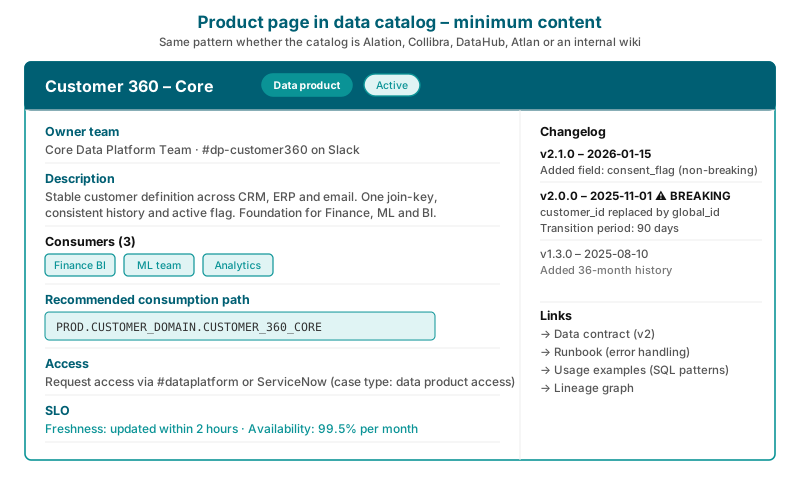
Minimum on a data product page:
- owner team + point of contact (not dependent on an individual)
- customers + value hypothesis (named customer groups)
- one recommended consumption path (the official product surface)
- access pattern without social capital (how to get access, not who you know)
- change/deprecation (changelog + notification + transition for breaking changes)
- contract light: keys/time logic + definitions people often misunderstand
- examples: “this is how you use it” (join, typical patterns, pitfalls)
This is not “lots of documentation”. It is friction removal: find → understand → get access.
Take Customer 360 – Core as an example: the owner team is the data domain within the CRM team, named customers are the sales team and customer service, the recommended consumption path is a view with join key and validity period, and the access pattern is one Jira request to the owner team. That is not a lot to write. It is exactly enough for the next team to avoid asking in Slack.
Component: when it is engine room (but still needs to be tidy)
Components need less — but they must be clear that they are internals.
Minimum on a component page:
- owner (team) and point of contact
- purpose (one sentence that makes it understandable)
- lineage/dependencies (rough is enough)
- classification for sensitivity/PII
- a clear statement saying: “This is a component (internal), not a supported product surface.”
The last point is undervalued: users cope well with something being internal — they cope poorly with being led to believe that an internal is a supported interface.
How to make the difference visible in the data catalogue
“Having two types” is not enough if it only says so in a wiki. The difference must be visible and filterable. The data catalogue should describe both components and data products. But it must make the difference visible.
Distinctions that work
Start with the basics:
- a clear type:
Data product/Component - a visible badge in search and listings
- a filter that lets users choose “show only data products”
- a product surface marker that distinguishes “supported” from “internal”
- a simple lifecycle status on data products (draft/pilot/active/deprecating/retired)
If you get this in place, you will see more catalogue usage without having “filled in everything”.
A practical rule for new deliverables
Start new deliverables as a component.
Promote to data product when:
- you have consumers you can name
- you can sustain a promise over time (ownership + capacity)
- you have chosen one supported product surface
This gives you natural portfolio management without introducing a governance regime.
The next step is to define what quality means for the product, and which promises you can measure: Quality and SLOs for data products.
