Change, versioning and deprecation practice

Tags: #data products, #SemVer data, #deprecation data products
Controlled change that stops customers creating copies.
Change is the norm
Without a clear practice for change, two things happen:
- consumers create copies “just in case”
- product surfaces become harder to improve because every change feels risky
The goal of this chapter is to make change predictable without making it heavy: clear definitions, a simple versioning logic and a tidy way to deprecate.
What is a breaking change in a data product?
In data products, “breaking” is often more than a column name changing. The greatest risk is silent misuse: everything still runs, but produces different numbers.
Define breaking change broadly, but with concrete examples, otherwise all changes end up in a grey area.
Typical breaking changes
A change should be treated as breaking when it can cause consumers to fail, or to produce incorrect results without noticing. Common categories:
- Semantics: you change the meaning of a field, a KPI, or a definition (“active customer”, “revenue”, “order status”)
- Keys and cardinality: join keys change, or the relationship changes (one-to-one becomes one-to-many)
- Granularity: you move from order line to order, or from day to hour, without making it explicit
- Time logic: change in what “valid now” means, history model, or how periods are handled
- Filtering and scope: new exclusions/inclusions that change the population (e.g. test orders, internal customers, “paid orders only”)
- Access and policy: a change in access control that causes consumers to lose access or face new restrictions
Schema changes can also be breaking (columns removed, data type changed), but in data products it is the semantics that are the most dangerous.
Non-breaking changes
The opposite should also be clear: changes that normally do not need a major process, but should still be logged.
Examples:
- new columns that are additive and clearly documented
- performance improvements in the engine room without changing the product surface
- a bugfix that makes the product more correct without changing the promise (but note: this can still require communication if numbers change)
Versioning: use SemVer as a language
Versioning is about having a shared language for consequence. SemVer is useful because everyone knows the pattern.
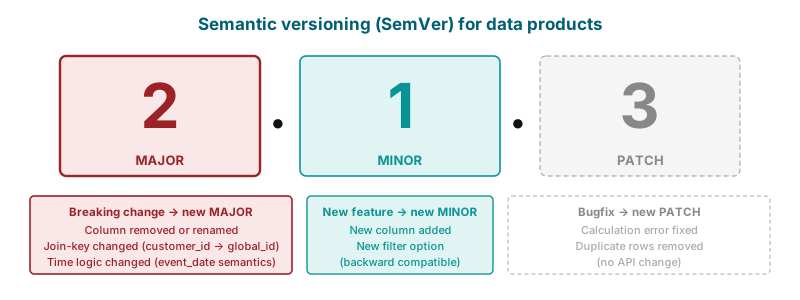
- MAJOR: breaking change in the product surface (consumers must take action)
- MINOR: backwards-compatible extension (consumers can choose to adopt)
- PATCH: correction/adjustment without changing the promise
The most important thing is consistency: that you use this language when communicating changes.
Where should the version “live”?
Choose one primary location. Two places are sufficient:
- version + changelog on the product page (catalogue/README)
- optionally a simple
product_versionin metadata, if you have a standard field or descriptor
A consumer should be able to find “what is the latest version, and what changed” without having to ask anyone. See In practice: product page, catalogue and components for what the product page should contain.
Change policy: notification, transition and targeted communication
A good change policy makes it easier to improve the product because it reduces fear among consumers. It need not be long, but it must be clear on three things.
When you are about to make a breaking change, you need to know who will be affected. This ties closely to the practice from earlier chapters: named customers/consumer environments and visible usage.
Standardise:
- where you notify (one channel + link to changelog)
- who receives notification (named consumer environments / owner teams)
- when you notify (minimum lead time appropriate to the product’s tier)
Transition: parallel surfaces where needed
For breaking changes, the default should be to offer a transition period where old and new surfaces run in parallel, with a clear deprecation date:
product_v1continues for a periodproduct_v2is introduced with a migration note- you measure adoption and follow up with those who have not yet migrated
Migration note: short and concrete
A migration note should answer:
- what is changing (semantics, keys, time logic, scope)
- what must the consumer do (SQL example or concrete action)
- what is the deadline, and what is the replacement
If the note becomes long, that is usually a signal that the change should have been split up.
Deprecation
Deprecation is not just tidying up. It is part of product work, because the portfolio otherwise grows without its signal value growing with it.
A good deprecation does three things:
- reduces run cost
- makes the catalogue more credible
- creates room to improve product surfaces without carrying all history forever
When a data product (or a product surface/version) is to be deprecated, the product page should always have:
- clear status: “deprecating”
- deadline: date when it is no longer supported
- recommended replacement (new surface or alternative product)
- what happens after the deadline (stop/degrade/delete — be concrete)
- link to migration note and changelog
Distinguish between:
- Deprecating: the product surface is still available, but not recommended. You support it only during a transition.
- Retired: the product surface is to be removed or downgraded to a component.
This connects directly to the lifecycle statuses “deprecating” and “retired” from the portfolio management in chapter 2. It makes the portfolio easier to understand: “safe to build on” vs “on its way out”.
How this relates to product vs component
Change and deprecation practice is one of the clearest differences between a data product and a component.
- A component can change more frequently, and change happens more internally.
- A data product has a product surface that others build on. Changes must therefore be treated as interface changes: notification, transition and clear history.
If you do not have capacity for this, it is perfectly fine to leave it as a component. That sets lower expectations, less risk of misunderstanding and less “noise” in the catalogue.
The next step is to see how this works in practice over time: Product forum, the first 100 days and what we have learned.
