
Contents
More from Data Engineering

AI makes us faster. That's not the problem.

Category: Data Engineering | Tags: #ai, #data engineering, #data platform
We build data platforms and pipelines with AI as a regular part of our workflow. Here's what we do in practice, what works — and what can go wrong.
AI has become a regular part of our daily work at Glitni. It makes us faster at much of what we would have to do anyway. And it makes it clearer what requires professional judgement.
The problem with AI in data work — such as data engineering and data platform development — is not the speed. It’s that speed makes it cheaper to overlook what’s wrong.
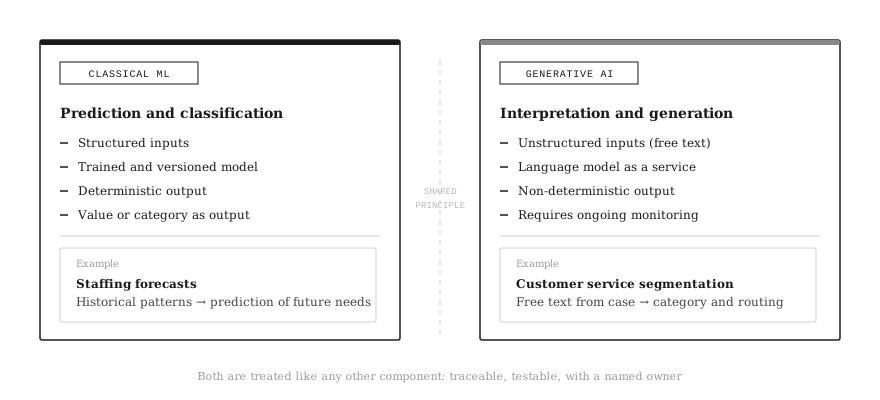
A brief clarification of terms: “AI” covers two quite different things in this article. One is classical machine learning — custom-built models that predict, classify or segment based on data. We’ve worked with that for a long time, and it’s an established part of data platform work. The other is generative AI — language models that write code, generate text and reason about problems. In recent years, “AI” has effectively become synonymous with the latter. That’s understandable, but imprecise. We use both, and they fill quite different roles.
It’s easy to turn this into a tool discussion: “which model”, “which plugin”, “which chat”. But for us, it’s more interesting to talk about what AI does to the discipline itself. When a machine can write more of the code, the value shifts away from knowing a particular configuration by heart — and towards understanding what data means, which trade-offs are right, and how to verify that what looks correct actually is correct.
Security is always the starting point
The most practical (and most boring) thing is also the most important: we only use AI tools that are approved within the client’s regime. If the client doesn’t have a policy or suitable tools in place, we address that as a separate workstream early on. It’s often one of the first topics we raise at project kick-off.
The way we work means this is rarely a practical problem in the coding itself: the AI assistant runs directly against the codebase in Git, integrated in VS Code or a similar development environment — in the configuration the client has approved. This means the AI assistant works against code locally in the client’s environment. Data does not leave the environment. That’s a different and safer architecture than pasting snippets into an external chat app.
But here’s a nuance worth raising: “the client’s regime governs” isn’t always straightforward in practice. A consultant joining a client project often has their own organisation’s settings for AI tools — set centrally by the consulting firm, across all projects. These don’t need to be in line with the client’s policy. A concrete example: the client hasn’t taken a position on MCP, but the consultant has it enabled via their own organisation settings. Here, having a good internal policy isn’t enough — it’s a gap that must be handled explicitly.
Our approach is simple: if something isn’t cleared, we don’t do it. The fact that something is technically possible doesn’t mean it’s within scope. Where we find that the client’s policy hasn’t kept pace with technical developments, we raise it as a topic someone needs to own and clarify — rather than navigating creatively around it.
Where we’re particularly careful is in reasoning and problem-solving outside the codebase — for example when discussing a data discrepancy or analysing an error pattern in a dialogue tool. Here we use synthetic examples or anonymised excerpts rather than production data. And regardless of context, the same applies: AI output is treated as a draft. Everything goes through PR review, tests and validation before anything lives its own life in production.
Example: Prompts we use in code work are written as if they could sit in a PR: what’s the context, what are we trying to solve, what are the assumptions, and what’s the definition of “correct”. That gives better results and makes it easier to explain the choice to the next person who reads the code.
Three ways AI lies to you in data engineering
Before we get into what AI is good at, it’s useful to know what it consistently gets wrong. The data discipline is particularly exposed to some recurring patterns — and knowing them makes the practice examples below more meaningful.
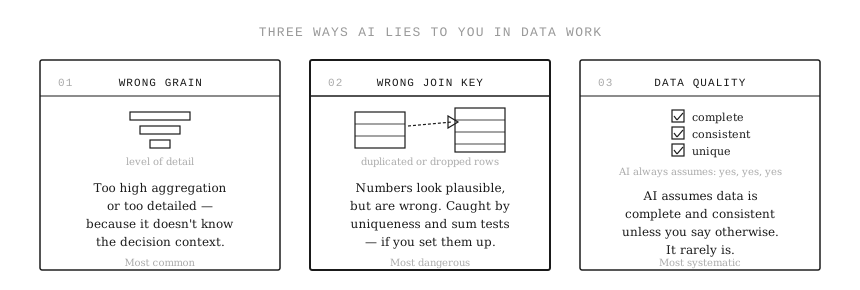
Wrong grain is the most common: AI suggests a model at the wrong level of detail — too high aggregation or too detailed — because it doesn’t know the decision context. It looks right until you check it against something you know the answer to.
Wrong join key is the most dangerous: the model looks plausible, the numbers are in the right ballpark, but they’re wrong because a join duplicates rows or drops some. Tests for uniqueness and sum checks catch this, but only if you remember to set them up.
Overly optimistic assumptions about data quality is the most systematic: AI assumes data is complete, consistent and unique unless you explicitly tell it otherwise. In production data, this is rarely true.
These three are the reason why verification and tests aren’t “extra work” — they’re what ensures the speed doesn’t become expensive in hindsight.
Why AI hits data engineering differently from other disciplines
What took half a day to write two years ago now takes minutes. A dbt model with a test suite, a pipeline config, an SQL query with edge cases — AI delivers a good enough first draft quickly. That’s a real change in the working day.
But this is happening in a discipline that has already become more standardised and tool-driven in recent years. We’ve built patterns, frameworks and platforms that make it easier to deliver. This means an increasing share of the work resembles “describe what you want and get a working implementation” — and that’s precisely the kind of work AI is good enough at.
That’s the kind of work AI is now good enough at. It can write SQL, set up pipeline config, suggest dbt structure and generate tests. Not perfect, but good enough that you get 80% of the way quickly. And when it does, it changes the division of labour in teams: less time writing first, more time checking, discussing and making decisions.
Example: “Create a dbt model that calculates active customer per month, with a clear definition and tests for unique keys and null values.” You get a suggestion quickly. But you still need to clarify what “active” means, and which exceptions apply.
This also affects the tool market. When an agent can see a flow from A to B as a whole, the boundaries between “ingest”, “transform” and “orchestration” become less important. The question increasingly becomes whether you have control over the flow end-to-end, and less about whether you’ve chosen the right tool in each individual layer. The platforms that hold data stand more firmly. The layers around them become more replaceable.
How we use it in everyday work — concretely
We primarily use an AI assistant integrated directly in VS Code or a similar development environment — against the codebase in Git, in the configuration the client has approved. In addition, we use dialogue tools for reasoning, problem analysis and documentation, where we work with synthetic or anonymised examples. It’s rarely “write the entire solution”, and more often “give me a first draft, and I’ll take it from there”.
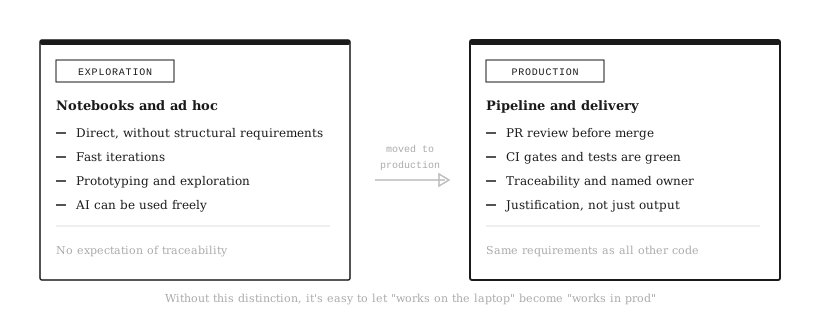
A distinction we find useful to maintain is between exploration mode and production mode. In exploration — notebooks, ad hoc analysis, prototyping — AI can be used directly and without particular structural requirements. When something moves to a production pipeline, the requirements tighten: the same expectations for PR review, tests and traceability as all other code. Without that distinction, it’s easy to let “works on the laptop” become “works in prod”.
In dbt, we use AI extensively to establish a baseline quickly: a suggested model structure, coding of the first couple of models, YAML documentation and a starter test suite. That gives pace in the early stages, and it makes it easier to get standards in place. But the effect only comes when we follow up with what AI can’t do for us: clarifying concepts, ensuring ownership and checking that the models answer decisions someone actually cares about.
Example: We often ask for a first draft of a test suite in dbt: not null on keys, unique where uniqueness is expected, accepted values on status fields, and freshness checks on sources. It takes minutes to get a draft. It still takes experience to know what should be tested first.
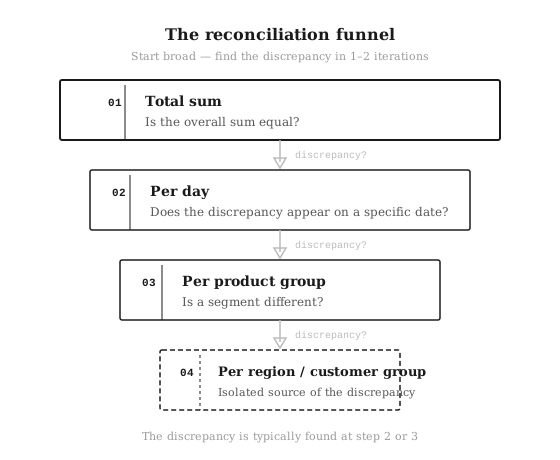
In modernisation and migration, AI is particularly useful for reconciliation. Not because it “understands the data”, but because it’s good at suggesting checkpoints and queries that quickly reveal discrepancies: sums over time, row counts, distinct keys, null and duplicate checks. That gets us to a systematic approach faster. But it doesn’t shift the responsibility: humans must still explain discrepancies, and the business must still approve what is correct.
Example: When two reports don’t match, we use AI to suggest a “funnel” for reconciliation: start with the total sum, then by day, then by product group, then by region or customer group. We often find the discrepancy in one or two iterations instead of ten.
We also use AI extensively on what often gets pushed down the priority list: documentation and PR text. First drafts for ADRs, how-tos, changelogs and PR descriptions based on diffs make it easier to maintain traceability and shared understanding. It sounds minor, but it’s often what determines whether a solution can be maintained by more people than those who built it.
Example: When we change a model that affects a KPI, we ask AI to help us write a PR description with: what changes, why, which tables and models are affected, and how we can validate that the numbers still hold.
One practice we’ve found useful is treating good prompts as team resources — versioned in Git alongside code. A well-functioning prompt for generating dbt tests or writing PR descriptions is just as much a reusable resource as an SQL template. That makes it easier to share practices across consultants, and it gives context to the next person who takes over a project.
When AI is the pipeline itself — not just the tool that builds it
It’s easy to think of AI in data engineering as “the assistant in the IDE”. But we also use it as an integrated component in the pipeline itself — and here the distinction between classical machine learning and generative AI is particularly clear.
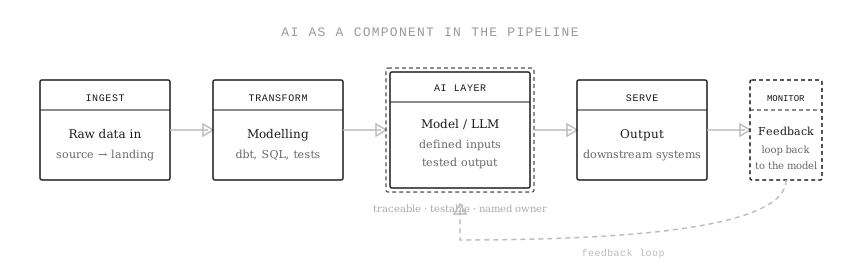
We use classical machine learning for prediction and structured classification: for example, custom-built models that predict staffing needs based on historical patterns. Here the inputs are defined, the model is trained and versioned, and the output is a value or category that downstream systems consume in the usual way.
We use generative AI where the input is unstructured and we need linguistic interpretation: for example, segmentation of customer service cases with language models, where free text needs to be categorised and routed. Here the challenges are somewhat different — output is less deterministic, and it places higher demands on testing and monitoring of actual behaviour over time.
Common to both: the principle is the same as for the rest of the platform work. The AI component must be traceable, testable and controlled. We know which data fields are sent in, we test the output, and we treat it like any other part of the pipeline. What we actively avoid is black-box dependencies — situations where no one any longer knows which data fields drive a decision, or where the AI layer is loosely coupled from the rest of the platform controls.
Part of this is building feedback loops from production back to model or prompt. What was the output in production? Did it match expected results? And if not — does it update the model, the prompt or the training data? For classical ML this is established MLOps practice. For generative AI in pipelines it’s newer, but equally necessary. Without it, there’s no systematic way to know whether the AI component degrades over time as data and context change.
Speed increases — but that’s not where value shifts
We become more productive on tasks with a clear shape. That applies to coding, test skeletons, documentation and summaries. In practice, it means we get to “a working suggestion” faster.
But the big bottleneck in data work is often not producing more code. It’s agreeing on what data means, who owns it, and how we know that what we deliver is correct. AI doesn’t remove these discussions. It can make them clearer, because it makes it cheaper to build things — and therefore more visible when we build things that nobody actually uses to make decisions.
We also see that experienced people often get more out of AI than less experienced ones. Not because they’re better at using tools, but because they’re better at evaluating the answers. They stop earlier, challenge more and know what needs to be verified before something is true in production. An important nuance: seniors spend more time disproving their own assumptions than confirming them. It’s about actively looking for what might be wrong — not just reading the answers critically.
Everyone improves, but we believe the gap can widen if you don’t work deliberately with review, validation and learning within teams.
Three things that maintain control
We’ve settled on three minimum practices we recommend regardless of how much or how little AI a team uses.
Verification before merge. AI can write a lot, but it’s PR review, CI gates and tests that determine whether it becomes part of the solution. “AI suggested this” is not a justification — “this is correct because, and this is what can go wrong” is.
Reconciliation as part of changes and migration. Not as an activity at the end, but as a plan with checkpoints, differences and explanation of discrepancies.
Concepts and definitions with a named owner. It’s hard to automate your way out of disagreement. That disagreement must be handled with simple, clear definitions that are used.
Summary
AI makes us faster at much of what we do every day. But the most important thing it does is shift attention: from producing to verifying, from tools to decision value, and from individual delivery to shared practice.
If you use it without the right checkpoints, AI just becomes an efficient way to produce more errors at higher speed. And that’s also a type of efficiency — just not the one you want.
Questions we often get about AI in delivery
Does AI increase the gap between junior and senior? It can — and we see it in practice. A junior who gets a plausible answer from AI stops less often to disprove the assumption than a senior would. It’s not about tool use, but about knowing what might be wrong. That’s why we deliberately work in pairs on the most important clarifications, and we often put a senior on review of AI-generated code that touches critical models — not because the code is bad, but because that’s where the risk sits.
What do you consider “client data”? Everything that can reveal business logic, individuals, transactions, customer lists, agreements, prices or internal matters. In code work, this is rarely a practical problem — the AI assistant works against the codebase locally in the client’s environment, not against data in an external service. Where we’re careful is in reasoning and dialogue outside the codebase: there we use synthetic examples or anonymised excerpts.
What do you do if the client doesn’t have a policy or approved tools? Then we raise it early and put a minimum in place: what is permitted, which tools are approved, and in which configuration. In the meantime, the starting point is conservative: we don’t use AI tools against code or data that hasn’t been cleared. We’re also mindful that consultants may have their own organisation settings that deviate from the client’s policy — this is something we clarify explicitly, not something we assume is aligned.
What does a “good prompt” look like for you? We write prompts as if they could sit in a PR: context, what we’re trying to solve, assumptions, what defines “correct”, and how it should be verified. That gives better results and less clean-up.
How do you quality-assure AI-generated code? AI output is treated as a draft. We still have the same requirements: PR review, tests, CI gates and explicit validation where the risk is high — particularly during migration. If we can’t explain the change, we can’t merge it either.
Which AI tools do you use? We’ve standardised on one primary AI assistant internally — in the IDE and in dialogue. Which services we use in a specific project depends on what the client has approved. We care more about practice and checkpoints than about any one particular model.