
Synapse Analytics | A Guide

We walk through what Azure Synapse Analytics is, which components make up its ecosystem, and how Azure Synapse can fit into a data platform architecture. We then discuss how Azure Synapse Analytics positions itself in the market compared to alternative products. We provide expert tips on how Azure Synapse Analytics should be used for data engineering and machine learning. We also provide resources to help you get started.
Contents
What is Azure Synapse Analytics?
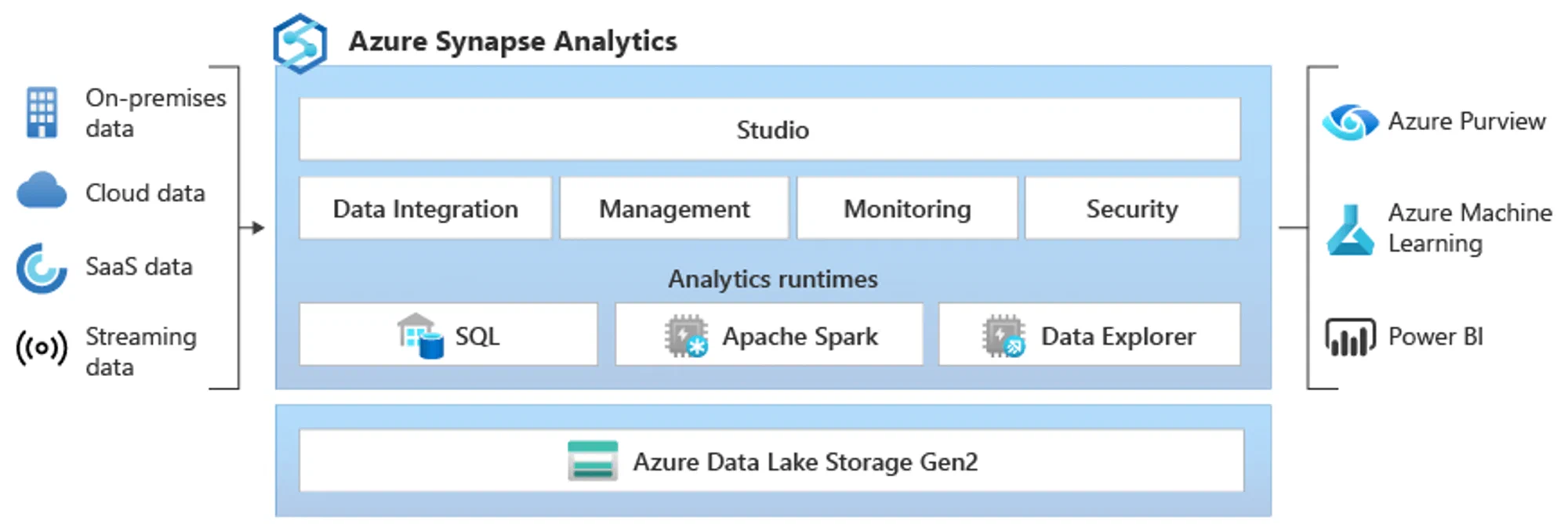
Azure Synapse Analytics is an integrated analytics platform that seamlessly connects several well-known Azure services in data integration, storage, data warehousing, data analytics, and machine learning. This enables multiple needs from many stakeholders to be addressed within the same platform.
Azure Synapse Analytics is a cloud solution that scales its capacity to balance costs and processing time – you pay for the consumption of a given service (e.g. runtime for a given query).
The idea behind Azure Synapse Analytics has been to offer one platform for existing and well-known solutions such as Azure Data Lake Storage, Azure Data Factory, and Azure SQL Data Warehouse – now packaged as integrated services with new names (such as Pipelines and Provisioned SQL Pools), and enhanced with new services such as serverless data warehousing (On Demand SQL Pools) and support for Spark with Provisioned Spark Pools.
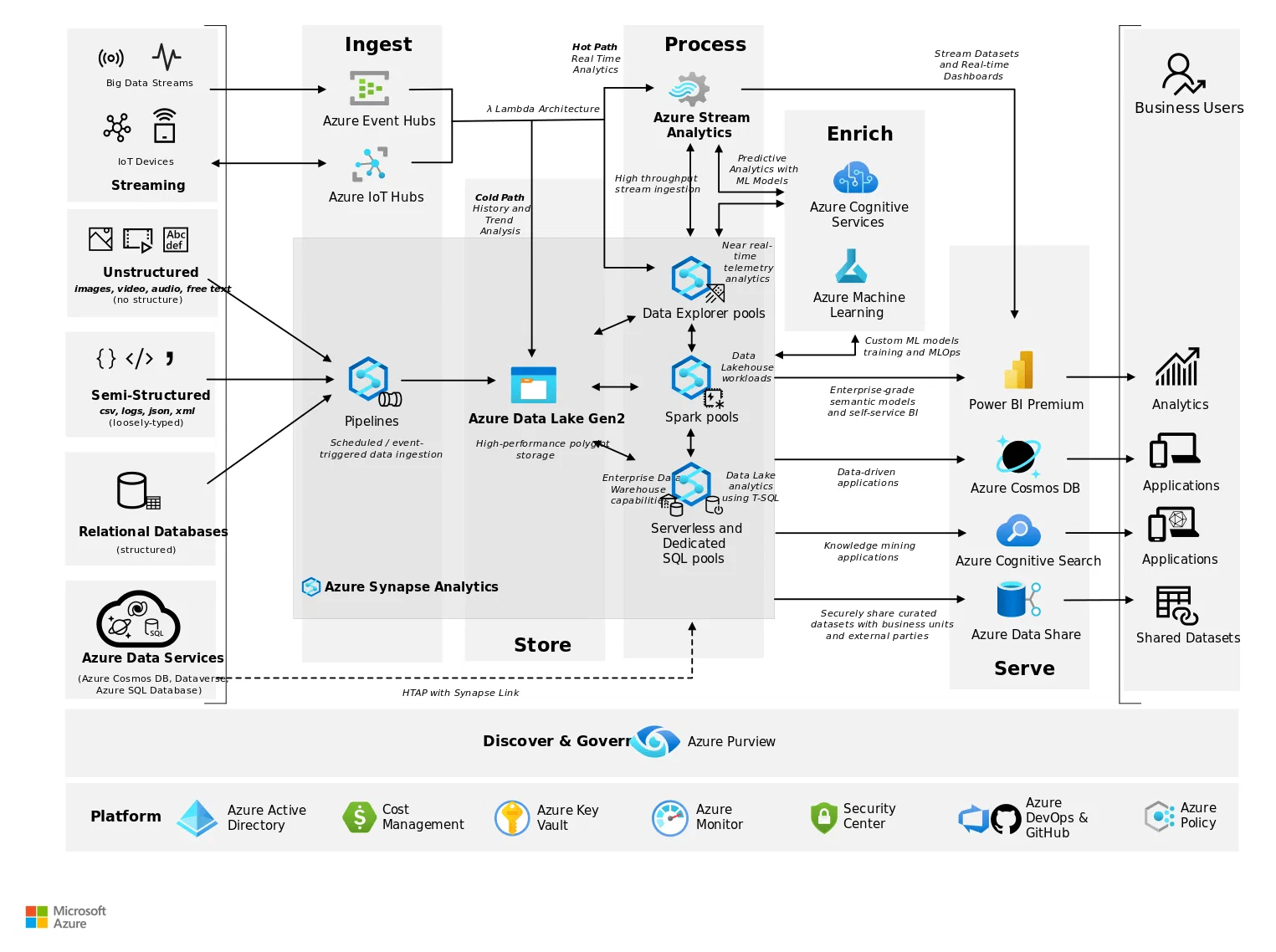
How does Azure Synapse Analytics fit into a modern data architecture?
Azure Synapse Analytics offers services that cover multiple needs for various use cases and stakeholders.
- Data integration: Azure Synapse Analytics includes a service for data integration, i.e. for ingesting source data, known as Azure Synapse Pipelines. You can also use Azure Data Factory as a standalone component if you do not wish to use Synapse Analytics’ integrated solution – which may be relevant as these two services differ somewhat.
- Flexibility: Services in Azure Synapse Analytics support multiple needs in a modern data architecture. The freedom of choice means you do not have to commit to multiple products from different service providers with their own terms. If you want a lightweight data warehouse that does not require enormous processing resources, you can spin up a serverless database with SQL “on demand”, a so-called On Demand SQL Pool. If you need heavier processing power or you find that serverless runtime reaches a certain threshold, you can spin up a Dedicated SQL Pool. Should you need Spark for processing – provision a Spark Pool. There are many tools in the toolbox.
- Integrated platform: A major advantage of Azure Synapse Analytics is the ability for seamless integration with existing Azure services, such as Azure Active Directory, Azure Key Vault, Azure DevOps, Azure Machine Learning, and Power BI. This can shorten the time needed to set up functionality in supporting services such as security and access management, version control, and monitoring in Azure Synapse Analytics.
How does Azure Synapse Analytics position itself against other tools?
Azure Synapse Analytics can be a good alternative for organisations that already use Microsoft Azure:
- Well-known and proven data warehousing technology: Microsoft has been in the game for a long time and has held significant market share with well-known solutions in Microsoft SQL Server such as Integration Services, Analysis Services, and Reporting Services. For many developers, there will be familiar components and features in Azure Data Factory and Azure Synapse Pipelines that they recognise from SQL Server Integration Services (SSIS). T-SQL will also be a familiar standard for most developers.
- Flexible cost model: The choice of services and needs means you can be cost-conscious. As with most cloud solutions in Azure for data and analytics, they have a consumption-based pricing model, meaning you pay for processing time. Furthermore, you can choose to lock in the price by selecting dedicated resources if you have more static processing needs over time.
- Platform mindset: Azure Synapse Analytics is part of Azure, making it straightforward to set up integrations with other services. This simultaneously increases the risk of vendor lock-in – which is somewhat less of a concern with Databricks and Snowflake.
Some advice from our experienced data engineers before implementing Azure Synapse Analytics
- Plan the architecture carefully: Review and understand current and future user requirements that set the parameters for technical requirements. Also think early about volume, complexity, and end-to-end data flow design to evaluate components that fit the architecture.
- Choose the right services for data integration and storage: Depending on technical needs, it is not necessary to go with Synapse Pipelines. You can perfectly well use Azure Data Factory as a standalone service, at the expense of other functionality such as triggering a notebook in Spark Pools. The same clarification should be made for data storage – where you have flexibility in services such as serverless and dedicated SQL databases.
- Scale resources as needed: Services in Azure Synapse can be scaled with resources as needed. Plan for this when processing resource requirements increase – and correspondingly scale down when resource needs have decreased.
- Security and monitoring: Ensure that you have designed for security in line with your organisation’s requirements and guidelines. This may include access control for services, networks, read access to data, and similar security requirements. For monitoring, most services in Azure Synapse have this built in – but do take advantage of services such as Azure Log Analytics and Azure Monitor for more comprehensive logging, monitoring, and alerting.
- Best practices: Established practices for databases also apply to Azure Synapse. Start early by addressing low-hanging fruit that can save processing time and costs, such as indexing, partitioning, and object types.
- Explore integrations with other Azure services: Take advantage of straightforward integrations with other services from Azure and Microsoft such as Azure Machine Learning, Power BI, and Azure Stream Analytics to extend analytics and reporting capabilities.
- Do not adopt every service and product offered by Microsoft: Even though it may seem expedient to have as few vendors as possible, we find that some of the services and products on offer have limited functionality, and that other alternatives can provide more value and less frustration. Choose carefully. There are also many good third-party solutions that integrate well with other Microsoft technologies.
Frequently asked questions about Azure Synapse Analytics
Which languages and frameworks does Azure Synapse Analytics support?
Azure Synapse Analytics supports several languages and frameworks, including T-SQL, Python, Scala, and .NET. This allows developers to use familiar tools and languages.
How does pricing work for Azure Synapse Analytics?
Pricing depends on which services you wish to use. Azure services for data and analytics often follow consumption-based pricing models, where you pay for usage. In addition, you often have the option to lock in the price by selecting dedicated resources, which can be relevant if you have more static processing needs over time and want greater predictability.
How does security work in Azure Synapse Analytics?
Azure Synapse Analytics offers various security features including encryption of data at rest and in transit, Azure Private Link, managed private endpoints, firewall rules, and virtual network service endpoints. In addition, the service complies with standards such as GDPR, HIPAA, and FedRAMP.
Getting started with Azure Synapse Analytics
If you want to learn more about Azure Synapse Analytics, there are many resources available. Here are some recommendations:
- To get started with Azure Synapse Analytics for testing and demonstrating capabilities, you can follow this guide published by Azure on GitHub.
- Microsoft offers a range of courses and certifications related to Azure Synapse Analytics and other Azure services via Microsoft Learn.
- YouTube has, as always, many good introductory videos that will help you understand the key concepts. Here is a series we found helpful:
