
Snowflake | A Guide

In this article, we discuss a major - and rapidly growing - SaaS technology, Snowflake. We go through exactly what Snowflake is and how the technology supports a data platform architecture. We will also answer some frequently asked questions related to Snowflake and comparable solutions. We provide expert tips on how Snowflake should be used for data engineering and machine learning. We also provide resources to help you get started.
Contents
What is Snowflake?
Snowflake is a cloud-based platform for modern data warehousing and machine learning with services for both processing and storage. The platform initially supported traditional data warehouse needs with smart solutions for scaling, governance, and database object cloning that allow you to simplify processes related to DataOps.
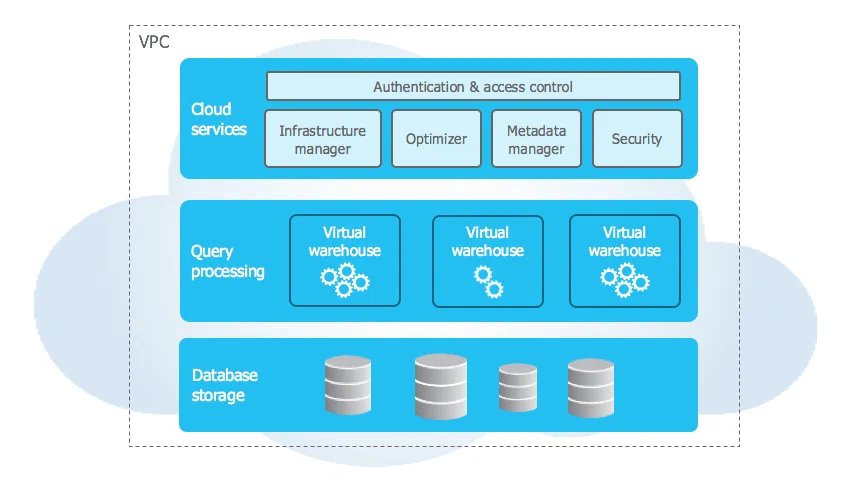
More recently, they have also expanded Snowflake with support for machine learning and advanced analytics through Python support and Feature Engineering via Snowpark (https://www.snowflake.com/en/data-cloud/snowpark/). This allows data engineers and data scientists to work on the same platform. Furthermore, it can simplify data architecture by having fewer components for storage and processing in the same platform.
Snowflake can run on Microsoft Azure, Amazon Web Services (AWS), and Google Cloud Platform (GCP), providing flexibility in the choice of cloud provider.
In summary, Snowflake provides the following capabilities out of the box:
- A single platform for data storage and analytics for both data engineers and data scientists
- The ability to dynamically scale by adjusting the required processing power
- A mature tool for traditional data warehouse needs
- Support for Python and SQL
How does Snowflake fit into a modern data platform?
Snowflake can be a good option to consider as a platform for covering processing and storage components for multiple data teams. The advantage of working on the same platform is that data products are available across teams. Furthermore, it can facilitate closer collaboration between teams working with data warehousing and advanced analytics.
Snowflake has been predominantly geared toward traditional data warehouse needs - with smart solutions for ensuring a good operational and developer experience. Among other things, they support “Time Travel” and “Zero-Copy Cloning,” which make it easy to restore previous versions of data and create clones of databases without copying the data. Additionally, they support most well-known data types (including csv, parquet, orc, xml, and JSON, among others).
Snowflake has recently introduced support for Python and components such as Snowpark to ensure that Data Science needs are also part of the platform. This is new - but will have increased focus from Snowflake going forward.
How does Snowflake position itself against other tools?
Snowflake has traditionally positioned itself for data warehouse use cases, where they seek to simplify and automate tasks and configurations. They succeed well at this and are perceived as easier to get started with for organizations that primarily have these use cases.
Snowflake integrates well with services from other vendors on platforms such as Microsoft Azure, Google Cloud Platform (GCP), and Amazon Web Services (AWS). Snowflake’s primary focus is data storage and processing, meaning additional technologies are needed to build a complete data and analytics platform.
Here are some of the key ways Snowflake differs from data platforms such as Amazon Redshift, Google BigQuery, and Microsoft Azure SQL Data Warehouse/Microsoft Data Lake Gen2 with Synapse:
- Scalability: Snowflake has a multi-cluster, shared data architecture that provides independent scaling of storage and compute resources. This means you can scale up or down capacity as needed without affecting the performance of other workloads.
- Pay-as-you-go pricing: Snowflake offers a pay-as-you-go pricing model that lets you pay for what you actually use, rather than pre-paying for fixed resources. Snowflake can in some cases be more expensive than some of the other alternatives for organizations with large amounts of data and high compute needs.
- Data Sharing: Snowflake makes it easy to share data between different organizations and business units without copying or moving data.
- Support for semi-structured data: Snowflake supports storage and querying of semi-structured data formats such as JSON, Avro, and Parquet.
- Security: Snowflake offers robust security features, including data encryption, multi-factor authentication, and secure data sharing. This can be especially important for organizations handling sensitive data.
Some advice from our experienced data engineers
- Clarify the mandate for Snowflake: If you have multiple components in a data architecture with overlapping functionality, it is important to clarify early what should take place in Snowflake and what should take place in other tools.
- Map out users and roles: It is wise to map out the personas and stakeholders who will be involved in Snowflake. These should inform how you set up roles for security and access management.
- Have a plan for setting up database objects: How should databases, schemas, and objects be structured? There are many paths to Rome here - but it is important to actively address this early, so you can save time on refactoring later.
- Have a plan for how to roll out changed and new objects: Depending on how mature the team is in modern development principles, it is important to have a clear approach to how changes in the data warehouse should be deployed.
Getting started with Snowflake
To get started with Snowflake for testing and demonstrating capabilities, you can do the following:
- Sign up for an account: Visit the Snowflake website (https://www.snowflake.com/) and sign up for an account. Snowflake offers a free trial period.
- Upload data: Start uploading data to Snowflake, either by using the web interface, SnowSQL (the command-line client), or one of the supported integrations with ETL (Extract, Transform, Load) tools.
- Run queries and analyses: Once your data is uploaded, you can start running queries and analyses using SQL and integrate with supported analytics tools.
Official documentation can be found here:
- Snowflake Documentation: https://docs.snowflake.com/en/
- Implementation Guide: https://docs.snowflake.com/en/user-guide/getting-started-tutorial.html
